강의
Project MySelectShop - Refactoring
[수업 목표]
teamsparta.notion.site
뭐지 지금 굉장히 뒤죽박죽으로 정리가 되어있는데,,,, 이거 뭦,,,,,?
🫘 Bean 직접 생성
[BeanConfigurator]
package com.sparta.myselectshop.config;

import com.sparta.myselectshop.repository.ProductRepository;
import org.springframework.context.annotation.Bean;
import org.springframework.context.annotation.Configuration;

@Configuration
public class BeanConfiguration {
    @Bean
    public ProductRepository productRepository() {
        String dbUrl = "jdbc:h2:mem:db";
        String username = "sa";
        String password = "";
        return new ProductRepository(dbUrl, username, password);
    }
}
[ProductController]
package com.sparta.myselectshop.controller;

import com.sparta.myselectshop.dto.ProductMypriceRequestDto;
import com.sparta.myselectshop.dto.ProductRequestDto;
import com.sparta.myselectshop.dto.ProductResponseDto;
import com.sparta.myselectshop.service.ProductService;
import org.springframework.beans.factory.annotation.Autowired;
import org.springframework.web.bind.annotation.*;

import java.sql.SQLException;
import java.util.List;

@RestController
@RequestMapping("/api")
public class ProductController {

    private final ProductService productService;

    @Autowired
    public ProductController(ProductService productService) {
        this.productService =  productService;
    }

    // 관심 상품 등록하기
    @PostMapping("/products")
    public ProductResponseDto createProduct(@RequestBody ProductRequestDto requestDto) throws SQLException {
        // 응답 보내기
        return productService.createProduct(requestDto);
    }

    // 관심 상품 조회하기
    @GetMapping("/products")
    public List<ProductResponseDto> getProducts() throws SQLException {
        // 응답 보내기
        return productService.getProducts();
    }

    // 관심 상품 최저가 등록하기
    @PutMapping("/products/{id}")
    public Long updateProduct(@PathVariable Long id, @RequestBody ProductMypriceRequestDto requestDto) throws SQLException {
        // 응답 보내기 (업데이트된 상품 id)
        return productService.updateProduct(id, requestDto);
    }

}
[ProductService]
package com.sparta.myselectshop.service;

import com.sparta.myselectshop.dto.ProductMypriceRequestDto;
import com.sparta.myselectshop.dto.ProductRequestDto;
import com.sparta.myselectshop.dto.ProductResponseDto;
import com.sparta.myselectshop.entity.Product;
import com.sparta.myselectshop.repository.ProductRepository;
import org.springframework.beans.factory.annotation.Autowired;
import org.springframework.stereotype.Component;

import java.sql.SQLException;
import java.util.List;

@Component
public class ProductService {

    private final ProductRepository productRepository;

    @Autowired
    public ProductService(ProductRepository productRepository) {
        this.productRepository = productRepository;
    }

    public ProductResponseDto createProduct(ProductRequestDto requestDto) throws SQLException {
        // 요청받은 DTO 로 DB에 저장할 객체 만들기
        Product product = new Product(requestDto);

        return  productRepository.createProduct(product);
    }

    public List<ProductResponseDto> getProducts() throws SQLException {

        return productRepository.getProducts();
    }

    public Long updateProduct(Long id, ProductMypriceRequestDto requestDto) throws SQLException {
        Product product = productRepository.getProduct(id);

        if(product == null) {
            throw new NullPointerException("해당 상품은 존재하지 않습니다.");
        }

        return productRepository.updateProduct(product.getId(), requestDto);
    }

}
[ProductRepository]
package com.sparta.myselectshop.repository;

import com.sparta.myselectshop.dto.ProductMypriceRequestDto;
import com.sparta.myselectshop.dto.ProductResponseDto;
import com.sparta.myselectshop.entity.Product;

import java.sql.*;
import java.util.ArrayList;
import java.util.List;

public class ProductRepository{

    private final String dbUrl;
    private final String username;
    private final String password;

    public ProductRepository(String dbUrl, String username, String password) {
        this.dbUrl = dbUrl;
        this.username = username;
        this.password = password;
    }

    public ProductResponseDto createProduct(Product product) throws SQLException {

        // DB 연결
        Connection connection = getConnection();

        // DB Query 작성
        PreparedStatement ps = connection.prepareStatement("select max(id) as id from product");
        ResultSet rs = ps.executeQuery();
        if (rs.next()) {
            // product id 설정 = product 테이블의 마지막 id + 1
            product.setId(rs.getLong("id") + 1);
        } else {
            throw new SQLException("product 테이블의 마지막 id 값을 찾아오지 못했습니다.");
        }

        ps = connection.prepareStatement("insert into product(id, title, image, link, lprice, myprice) values(?, ?, ?, ?, ?, ?)");
        ps.setLong(1, product.getId());
        ps.setString(2, product.getTitle());
        ps.setString(3, product.getImage());
        ps.setString(4, product.getLink());
        ps.setInt(5, product.getLprice());
        ps.setInt(6, product.getMyprice());

        // DB Query 실행
        ps.executeUpdate();

        // DB 연결 해제
        ps.close();
        connection.close();


        return new ProductResponseDto(product);
    }

    public List<ProductResponseDto> getProducts() throws SQLException {
        List<ProductResponseDto> products = new ArrayList<>();

        // DB 연결
        Connection connection = getConnection();

        // DB Query 작성 및 실행
        Statement stmt = connection.createStatement();
        ResultSet rs = stmt.executeQuery("select * from product");

        // DB Query 결과를 상품 객체 리스트로 변환
        while (rs.next()) {
            Product product = new Product();
            product.setId(rs.getLong("id"));
            product.setImage(rs.getString("image"));
            product.setLink(rs.getString("link"));
            product.setLprice(rs.getInt("lprice"));
            product.setMyprice(rs.getInt("myprice"));
            product.setTitle(rs.getString("title"));
            products.add(new ProductResponseDto(product));
        }

        // DB 연결 해제
        rs.close();
        connection.close();

        return products;
    }

    public Long updateProduct(Long id, ProductMypriceRequestDto requestDto) throws SQLException {

        // DB 연결
        Connection connection = getConnection();

        // DB Query 작성
        PreparedStatement ps = connection.prepareStatement("update product set myprice = ? where id = ?");
        ps.setInt(1, requestDto.getMyprice());
        ps.setLong(2, id);

        // DB Query 실행
        ps.executeUpdate();

        // DB 연결 해제
        ps.close();
        connection.close();

        return null;
    }

    public Product getProduct(Long id) throws SQLException {
        Product product = new Product();

        // DB 연결
        Connection connection = getConnection();

        // DB Query 작성
        PreparedStatement ps = connection.prepareStatement("select * from product where id = ?");
        ps.setLong(1, id);

        // DB Query 실행
        ResultSet rs = ps.executeQuery();
        if (rs.next()) {
            product.setId(rs.getLong("id"));
            product.setImage(rs.getString("image"));
            product.setLink(rs.getString("link"));
            product.setLprice(rs.getInt("lprice"));
            product.setMyprice(rs.getInt("myprice"));
            product.setTitle(rs.getString("title"));
        }

        // DB 연결 해제
        rs.close();
        ps.close();
        connection.close();

        return product;
    }

    public Connection getConnection() throws SQLException {
        return DriverManager.getConnection(dbUrl, username, password);
    }

}

📌 🫘public interface ProductRepository extends JpaRepository<Product, Long>{}
- JpaRepository<**"@Entity 클래스", "@Id 의 데이터 타입">**를 상속받는 interface 로 선언
- 스프링 Data JPA 에 의해 자동으로 @Repository 가 추가됨
- 아래 @Repository 역할 대부분을 자동으로 수행해 줌
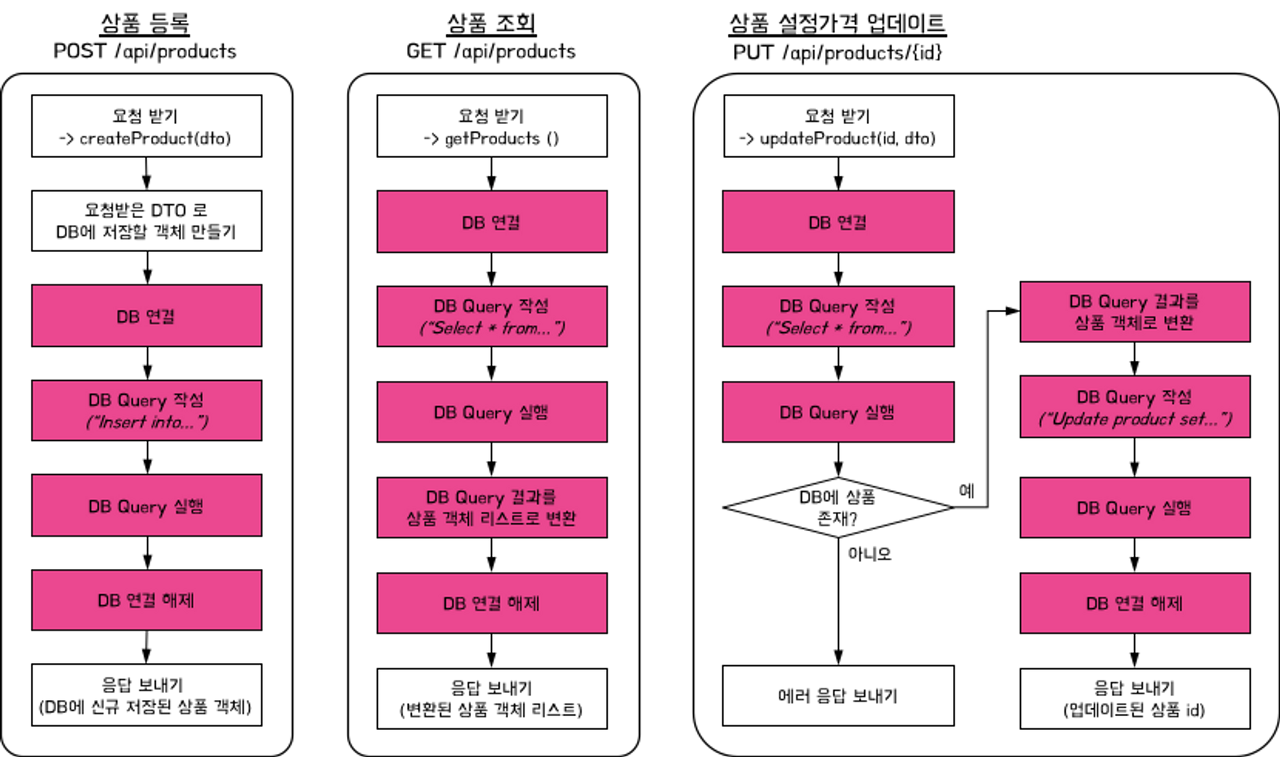
📌🫘 최종 코드
[ProductController]
- @RequiredArgsConstructor 어노테이션으로 의존성 주입
- HTTP Request 요청 온 것들을 받아서 ProductService로 넘김
- 가져온 값들을 파라미터로 보내줌
package com.sparta.myselectshop.controller;

import com.sparta.myselectshop.dto.ProductMypriceRequestDto;
import com.sparta.myselectshop.dto.ProductRequestDto;
import com.sparta.myselectshop.dto.ProductResponseDto;
import com.sparta.myselectshop.service.ProductService;
import lombok.RequiredArgsConstructor;
import org.springframework.web.bind.annotation.*;

import java.util.List;

@RestController
@RequestMapping("/api")
@RequiredArgsConstructor
public class ProductController {

    private final ProductService productService;

    // 관심 상품 등록하기
    @PostMapping("/products")
    public ProductResponseDto createProduct(@RequestBody ProductRequestDto requestDto) {
        // 응답 보내기
        return productService.createProduct(requestDto);
    }

    // 관심 상품 조회하기
    @GetMapping("/products")
    public List<ProductResponseDto> getProducts() {
        // 응답 보내기
        return productService.getProducts();
    }

    // 관심 상품 최저가 등록하기
    @PutMapping("/products/{id}")
    public Long updateProduct(@PathVariable Long id, @RequestBody ProductMypriceRequestDto requestDto) {
        // 응답 보내기 (업데이트된 상품 id)
        return productService.updateProduct(id, requestDto);
    }

}
[ProductService]
- ProductController에 맞춰서 로직을 수행
- DB에 접속하는 ProductRepository 와 연결되어 작업
- saveAndFlush() : db에 업데이트를 하는 flush가 아니라 쓰기 지연 SQL 저장소 내로 flush를 하는 과정
[JPA] save(), saveAll(), saveAndFlush() 차이
상황 > Card 객체를 DB에 insert 하기위해 JPA 메소드를 쓰려는데 insert 쿼리 메소드가 3개나 있다. 난 뭘 써야하나? 뭐가 다른걸까? 1개 저장 즉시 DB에 저장되지 않고 영속성 컨텍스트에 저장되었다가
velog.io
Spring jpa save(), saveAndFlush() 제대로 알고 쓰기
@Transactional 없이 save() vs saveAndFlush() public Member saveMember(MemberDTO memberDTO){ Member member = Member.create(memberDTO); member = memberRepository.save(member); member.setName("TaeHyun"); return member;// break point 설정 } 아래와 같
happyer16.tistory.com
[JPA] save 와 saveAndFlush의 차이
OS : MacOs Mojave DB : MySQL 5.7 DB Tool : Sequel Pro Framework : Spring Boot 2.0 맨밑에 결론있음 1. 준비 다음과 같은 member Entity를 준비했다. public class Member { @Id @GeneratedValue(strategy = GenerationType.IDENTITY) @Column(name =
ramees.tistory.com
- getProducts() : findAll()을 이용하여 List 형태로 Product를 가져와서 list로 반환
- updateProduct() : mtPrice 업데이트. JPA가 영속성에 의해 값을 추적해서 업데이트
package com.sparta.myselectshop.service;

import com.sparta.myselectshop.dto.ProductMypriceRequestDto;
import com.sparta.myselectshop.dto.ProductRequestDto;
import com.sparta.myselectshop.dto.ProductResponseDto;
import com.sparta.myselectshop.entity.Product;
import com.sparta.myselectshop.repository.ProductRepository;
import lombok.RequiredArgsConstructor;
import org.springframework.stereotype.Service;
import org.springframework.transaction.annotation.Transactional;

import java.util.ArrayList;
import java.util.List;

@Service
@RequiredArgsConstructor
public class ProductService {

    private final ProductRepository productRepository;

    @Transactional
    public ProductResponseDto createProduct(ProductRequestDto requestDto) {
        // 요청받은 DTO 로 DB에 저장할 객체 만들기
        Product product = productRepository.saveAndFlush(new Product(requestDto));

        return new ProductResponseDto(product);
    }

    @Transactional(readOnly = true)
    public List<ProductResponseDto> getProducts() {

        List<ProductResponseDto> list = new ArrayList<>();

        List<Product> productList = productRepository.findAll();
        for (Product product : productList) {
            list.add(new ProductResponseDto(product));
        }

        return list;
    }

    @Transactional
    public Long updateProduct(Long id, ProductMypriceRequestDto requestDto) {

        Product product = productRepository.findById(id).orElseThrow(
                () -> new NullPointerException("해당 상품은 존재하지 않습니다.")
        );

        product.update(requestDto);

        return product.getId();
    }

}
[ProductRepository]
package com.sparta.myselectshop.repository;

import com.sparta.myselectshop.entity.Product;
import org.springframework.data.jpa.repository.JpaRepository;

public interface ProductRepository extends JpaRepository<Product, Long> {
}
[Product]
package com.sparta.myselectshop.entity;

import com.sparta.myselectshop.dto.ProductMypriceRequestDto;
import com.sparta.myselectshop.dto.ProductRequestDto;
import com.sparta.myselectshop.naver.dto.ItemDto;
import lombok.Getter;
import lombok.NoArgsConstructor;
import lombok.Setter;

import jakarta.persistence.*;

@Getter
@Setter
@Entity // DB 테이블 역할을 합니다.
@NoArgsConstructor
public class Product {

    @Id
    @GeneratedValue(strategy = GenerationType.IDENTITY) // ID가 자동으로 생성 및 증가합니다.
    private Long id;

    @Column(nullable = false)
    private String title;

    @Column(nullable = false)
    private String image;

    @Column(nullable = false)
    private String link;

    @Column(nullable = false)
    private int lprice;

    @Column(nullable = false)
    private int myprice;

    public Product(ProductRequestDto requestDto) {
        this.title = requestDto.getTitle();
        this.image = requestDto.getImage();
        this.link = requestDto.getLink();
        this.lprice = requestDto.getLprice();
        this.myprice = 0;
    }

    public void update(ProductMypriceRequestDto requestDto) {
        this.myprice = requestDto.getMyprice();
    }
}
h2-console 에서도 브라우줘에도 제대로 뜬다 얏호!
📌 scheduler 추가
: 매일 새벽 1시에 관심 상품 목록 제목으로 검색해서, 최저가 정보를 업데이트
[Product]
Timestamped를 상속, updateByItemDto() 생성
package com.sparta.myselectshop.entity;

import com.sparta.myselectshop.dto.ProductMypriceRequestDto;
import com.sparta.myselectshop.dto.ProductRequestDto;
import com.sparta.myselectshop.naver.dto.ItemDto;
import lombok.Getter;
import lombok.NoArgsConstructor;
import lombok.Setter;

import jakarta.persistence.*;

@Getter
@Setter
@Entity // DB 테이블 역할을 합니다.
@NoArgsConstructor
public class Product extends Timestamped{

    @Id
    @GeneratedValue(strategy = GenerationType.IDENTITY) // ID가 자동으로 생성 및 증가합니다.
    private Long id;

    @Column(nullable = false)
    private String title;

    @Column(nullable = false)
    private String image;

    @Column(nullable = false)
    private String link;

    @Column(nullable = false)
    private int lprice;

    @Column(nullable = false)
    private int myprice;

    public Product(ProductRequestDto requestDto) {
        this.title = requestDto.getTitle();
        this.image = requestDto.getImage();
        this.link = requestDto.getLink();
        this.lprice = requestDto.getLprice();
        this.myprice = 0;
    }

    public void update(ProductMypriceRequestDto requestDto) {
        this.myprice = requestDto.getMyprice();
    }

    public void updateByItemDto(ItemDto itemDto) {
        this.lprice = itemDto.getLprice();
    }

}
[entity > Timestamped]
package com.sparta.myselectshop.entity;

import com.sparta.myselectshop.dto.ProductMypriceRequestDto;
import com.sparta.myselectshop.dto.ProductRequestDto;
import com.sparta.myselectshop.naver.dto.ItemDto;
import lombok.Getter;
import lombok.NoArgsConstructor;
import lombok.Setter;

import jakarta.persistence.*;

@Getter
@Setter
@Entity // DB 테이블 역할을 합니다.
@NoArgsConstructor
public class Product extends Timestamped{

    @Id
    @GeneratedValue(strategy = GenerationType.IDENTITY) // ID가 자동으로 생성 및 증가합니다.
    private Long id;

    @Column(nullable = false)
    private String title;

    @Column(nullable = false)
    private String image;

    @Column(nullable = false)
    private String link;

    @Column(nullable = false)
    private int lprice;

    @Column(nullable = false)
    private int myprice;

    public Product(ProductRequestDto requestDto) {
        this.title = requestDto.getTitle();
        this.image = requestDto.getImage();
        this.link = requestDto.getLink();
        this.lprice = requestDto.getLprice();
        this.myprice = 0;
    }

    public void update(ProductMypriceRequestDto requestDto) {
        this.myprice = requestDto.getMyprice();
    }

    public void updateByItemDto(ItemDto itemDto) {
        this.lprice = itemDto.getLprice();
    }

}
[scheduler > Scheduler]
package com.sparta.myselectshop.scheduler;

import com.sparta.myselectshop.entity.Product;
import com.sparta.myselectshop.naver.dto.ItemDto;
import com.sparta.myselectshop.naver.service.NaverApiService;
import com.sparta.myselectshop.repository.ProductRepository;
import com.sparta.myselectshop.service.ProductService;
import lombok.RequiredArgsConstructor;
import lombok.extern.slf4j.Slf4j;
import org.springframework.scheduling.annotation.Scheduled;
import org.springframework.stereotype.Component;

import java.util.List;
import java.util.concurrent.TimeUnit;

@Slf4j
@Component
@RequiredArgsConstructor
public class Scheduler {

    private final NaverApiService naverApiService;
    private final ProductService productService;
    private final ProductRepository productRepository;

    // 초, 분, 시, 일, 월, 주 순서
    @Scheduled(cron = "0 0 1 * * *")
    public void updatePrice() throws InterruptedException {
        log.info("가격 업데이트 실행");
        List<Product> productList = productRepository.findAll();
        for (Product product : productList) {
            // 1초에 한 상품 씩 조회합니다 (NAVER 제한)
            TimeUnit.SECONDS.sleep(1);

            String title = product.getTitle();
            List<ItemDto> itemDtoList = naverApiService.searchItems(title);
            ItemDto itemDto = itemDtoList.get(0);

            // i 번째 관심 상품 정보를 업데이트합니다.
            Long id = product.getId();
            productService.updateBySearch(id, itemDto);
        }
    }
}
[ProductService]
updateBySearching() 추가
package com.sparta.myselectshop.service;

import com.sparta.myselectshop.dto.ProductMypriceRequestDto;
import com.sparta.myselectshop.dto.ProductRequestDto;
import com.sparta.myselectshop.dto.ProductResponseDto;
import com.sparta.myselectshop.entity.Product;
import com.sparta.myselectshop.naver.dto.ItemDto;
import com.sparta.myselectshop.repository.ProductRepository;
import lombok.RequiredArgsConstructor;
import org.springframework.stereotype.Service;
import org.springframework.transaction.annotation.Transactional;

import java.util.ArrayList;
import java.util.List;

@Service
@RequiredArgsConstructor
public class ProductService {

    private final ProductRepository productRepository;

    @Transactional
    public ProductResponseDto createProduct(ProductRequestDto requestDto) {
        // 요청받은 DTO 로 DB에 저장할 객체 만들기
        Product product = productRepository.saveAndFlush(new Product(requestDto));

        return new ProductResponseDto(product);
    }

    @Transactional(readOnly = true)
    public List<ProductResponseDto> getProducts() {

        List<ProductResponseDto> list = new ArrayList<>();

        List<Product> productList = productRepository.findAll();
        for (Product product : productList) {
            list.add(new ProductResponseDto(product));
        }

        return list;
    }

    @Transactional
    public Long updateProduct(Long id, ProductMypriceRequestDto requestDto) {

        Product product = productRepository.findById(id).orElseThrow(
                () -> new NullPointerException("해당 상품은 존재하지 않습니다.")
        );

        product.update(requestDto);

        return product.getId();
    }

    @Transactional
    public void updateBySearch(Long id, ItemDto itemDto) {
        Product product = productRepository.findById(id).orElseThrow(
                () -> new NullPointerException("해당 상품은 존재하지 않습니다.")
        );
        product.updateByItemDto(itemDto);
    }
}
인증 & 인가
스프링 시큐리티에서 인증과 인가를 관리한다.
인증과 인가 개념 이해
[목차]
teamsparta.notion.site
📌 인증 VS 인가
인증 : 회원이 사이트에 로그인 하는 것
인가 : 사이트에서 접속하는 사람이 회원인지 비회원인지 가려서 정보 공개를 제한 하는 것
📌 인증의 방식
일반적으로 서버-클라이언트 구조로 되어있고, 실제로 이 두가지 요소는 아주 멀리 떨어져 있다. 그리고 Http 라는 프로토콜을 이용하여 통신하는데, 그 통신은 비연결성(Connectionless) 무상태(Stateless)로 이루어진다.
- 비 연결성 : 서버와 클라이언트가 연결되어 있지 않음. 서버는 실제로 하나의 요청에 하나의 응답을 내버리고 연결을 끊어버린다.
- 무상태 : 서버가 클라이언트의 상태를 저장하지 않음. 서버는 실제로 클라이언트가 직전에, 혹은 그 전에 어떠한 요청을 보냈는지 관심도 없고 전혀 알지 못한다.
🤔 그럼 우리가 보는 브라우저는 비연결성 상태인 것인데 어떻게 실시간 연결이 되는 것처럼 보일까?
url을 계층적으로 설계하고, 다음 요청에 대한 api url을 이전 계층에만 둔다면 연속적으로 사용하고 있다고 느껴진다.
📌 쿠키-세션 방식의 인증
서버가 특정 유저가 로그인 되었다는 상태를 저장하는 방식. 인증과 관련된 최소한의 정보는 저장해서 로그인을 유지시킨다.

- 사용자가 로그인 요청을 보낸다.
- 서버는 DB의 유저 테이블을 뒤져서 아이디 비밀번호를 대조하여 회원 여부를 확인한다.
- 실제 유저 테이블의 정보와 일치한다면 인증을 통과한 것으로 보고 “세션 저장소”에 해당 유저가 로그인 되었다는 정보를 넣는다.
- 세션 저장소에서는 유저의 정보와는 관련 없는 난수인 session-id를 발급한다.
- 서버는 로그인 요청의 응답으로 session-id를 내준다.
- 클라이언트는 받은 session-id를 쿠키라는 저장소에 보관하고 앞으로의 요청마다 session-id를 같이 보낸다. (주로 HTTP header에 담아서 보낸다)
- 클라이언트의 요청에서 쿠키를 발견했다면 서버는 세션 저장소에서 쿠키를 검증한다.
- 만약 유저 정보를 받아왔다면 이 사용자는 로그인이 되어있 사용자이다.
- 이후에는 로그인 된 유저에 따른 응답을 내어준다.
📌JWT(JSON Web Token) 기반 인증
JWT란 인증에 필요한 정보들을 암호화시킨 토큰을 의미. JWT 기반 인증은 쿠키/세션 방식과 유사하게 JWT 토큰(Access Token)을 HTTP 헤더에 실어 서버가 클라이언트를 식별한다.

- 사용자가 로그인 요청을 보낸다.
- 서버는 DB의 유저 테이블을 뒤져서 아이디 비밀번호를 대조하여 회원 여부를 확인한다.
- 실제 유저테이블의 정보와 일치한다면 인증을 통과한 것으로 보고 유저의 정보를 JWT로 암호화 해서 내보낸다.
- 서버는 로그인 요청의 응답으로 JWT 토큰을 내준다.
- 클라이언트는 그 토큰을 저장소에 보관하고 앞으로의 요청마다 토큰을 같이 보낸다.
- 클라이언트의 요청에서 토큰을 발견했다면 서버는 토큰을 검증한다.
- 이후에는 로그인 된 유저에 따른 응답을 내준다.
🤔 JWT?
✔️ 말 그대로 인증에 필요한 정보들을 암호화시킨 토큰을 의미

실제로 이렇게 생겼고, 자세히 보시면 ’ . ’을 사용하여 세 부분으로 나뉘어져 있다.
위는 암호화 알고리즘에 의해 암호화 된 모양이고, 해독하면 아래와 같은 모습이다.

가운데에, 실제 유저의 정보가 들어있고, HEADER와 VERIFY SIGNATURE부분은 암호화 관련된 정보 양식이라고 생각하면 된다.
📌MyselectShop에서 구현할 것
- ✔️ 키워드로 상품 검색하고 그 결과를 목록으로 보여주기
- ✔️ 관심 상품 등록하기
- ✔️ 관심 상품 조회하기
- ✔️ 관심 상품 최저가 등록하기
- 🆕 회원가입
- 🆕 로그인
📌 Product API
| 기능 | Method | URL | Request | Response |
| 메인페이지 | GET | /api/shop | index.html | |
|
키워드로 상품 검색하고 그 결과를 목록으로 보여주기
|
GET | /api/search?query=검색어 | [ { "title" : String, " link" : String, ”image” : String, "lprice" : int }, … ] |
|
| 관심 상품 등록하기 | POST | /api/products | { "title" : String, ”image” : String, "link" : String, "lprice" : int } |
{ ”id” : Long "title" : String, "link" : String, ”image” : String, "lprice" : int, "myprice" : int } |
| 관심 상품 조회하기 | GET | /api/products | [ { ”id” : Long "title" : String, "link" : String, ”image” : String, "lprice" : int, "myprice" : int }, … ] | |
| 관심 상품 최저가 등록하기 | PUT | /api/products/{id} | { "myprice" : int } |
id |
📌 HTML, JavaScript, CSS 준비
[resources > templates > signup.html]
회원 가입 Form 페이지
<!DOCTYPE html>
<html lang="en" xmlns="http://www.w3.org/1999/xhtml" xmlns:th="http://www.thymeleaf.org">
<head>
    <meta charset="UTF-8">
    <meta name="viewport"
          content="width=device-width, user-scalable=no, initial-scale=1.0, maximum-scale=1.0, minimum-scale=1.0">
    <meta http-equiv="X-UA-Compatible" content="ie=edge">
    <link rel="preconnect" href="https://fonts.gstatic.com">
    <link href="https://fonts.googleapis.com/css2?family=Nanum+Gothic&display=swap" rel="stylesheet">
    <link th:href="@{/style.css}" rel="stylesheet">
    <meta charset="UTF-8">
    <title>회원가입 페이지</title>
    <script>
        function onclickAdmin() {
            // Get the checkbox
            var checkBox = document.getElementById("admin-check");
            // Get the output text
            var box = document.getElementById("admin-token");

            // If the checkbox is checked, display the output text
            if (checkBox.checked == true){
                box.style.display = "block";
            } else {
                box.style.display = "none";
            }
        }
    </script>
</head>
<body>
<div id="login-form">
    <div id="login-title">Sign up Select Shop</div>

    <form method="POST" action="/api/user/signup">
        <div class="login-id-label">Username</div>
        <input type="text" name="username" placeholder="Username" class="login-input-box">

        <div class="login-id-label">Password</div>
        <input type="password" name="password" class="login-input-box">

        <div class="login-id-label">E-mail</div>
        <input type="text" name="email" placeholder="E-mail" class="login-input-box">

        <div>
            <input id="admin-check" type="checkbox" name="admin" onclick="onclickAdmin()" style="margin-top: 40px;">관리자
            <input id="admin-token" type="password" name="adminToken" placeholder="관리자 암호" class="login-input-box" style="display:none">
        </div>
        <button id="login-id-submit">회원 가입</button>
    </form>
</div>
</body>
</html>
[resources > templates > login.html]
회원 로그인 Form 페이지
<!DOCTYPE html>
<html lang="en" xmlns="http://www.w3.org/1999/xhtml" xmlns:th="http://www.thymeleaf.org">
<head>
  <meta charset="UTF-8">
  <meta name="viewport"
        content="width=device-width, user-scalable=no, initial-scale=1.0, maximum-scale=1.0, minimum-scale=1.0">
  <meta http-equiv="X-UA-Compatible" content="ie=edge">
  <link rel="preconnect" href="https://fonts.gstatic.com">
  <link href="https://fonts.googleapis.com/css2?family=Nanum+Gothic&display=swap" rel="stylesheet">
  <link th:href="@{/style.css}" rel="stylesheet">
  <meta charset="UTF-8">
  <title>로그인 페이지</title>
</head>
<body>
<div id="login-form">
  <div id="login-title">Log into Select Shop</div>
  <button id="login-kakao-btn" onclick="location.href='https://kauth.kakao.com/oauth/authorize?client_id=&redirect_uri=http://localhost:8080/api/user/kakao/callback&response_type=code'">
    카카오로 로그인하기
  </button>
  <button id="login-id-btn" onclick="location.href='/api/user/signup'">
    회원 가입하기
  </button>
  <form  method="POST" action="/api/user/login" >
    <div class="login-id-label">아이디</div>
    <input type="text" name="username" class="login-input-box">

    <div class="login-id-label">비밀번호</div>
    <input type="password" name="password" class="login-input-box">

    <button id="login-id-submit">로그인</button>
  </form>
  <div id="login-failed" style="display:none" class="alert alert-danger" role="alert">로그인에 실패하였습니다.</div>
</div>
</body>
<script>
  const href = location.href;
  const queryString = href.substring(href.indexOf("?")+1)
  if (queryString === 'error') {
    const errorDiv = document.getElementById('login-failed');
    errorDiv.style.display = 'block';
  }
</script>
</html>
[resources > templates > index.html]
로그인/회원가입 추가된 Shop 페이지
<!doctype html>
<html lang="ko" xmlns:th="http://www.thymeleaf.org">
<head>
  <meta charset="UTF-8">
  <meta name="viewport"
        content="width=device-width, user-scalable=no, initial-scale=1.0, maximum-scale=1.0, minimum-scale=1.0">
  <meta http-equiv="X-UA-Compatible" content="ie=edge">
  <script src="https://ajax.googleapis.com/ajax/libs/jquery/3.5.1/jquery.min.js"></script>

  <link th:href="@{/style.css}" rel="stylesheet">
  <script type="text/javascript" th:src="@{/basic.js}"></script>
  <title>나만의 셀렉샵</title>
</head>
<body>
<div class="header" style="position:relative;">
  <!--headr 추가 부분-->
  <div th:if="${username != '' }">
    <div id="header-title-login-user">
      <span th:text="${username}"></span> 님의
    </div>
    <div id="header-title-select-shop">
      Select Shop
    </div>
  </div>
  <div th:unless="${username != ''}">
    <div id="header-title-select-shop">
      Select Shop
    </div>
    <a id="sign-text" href="/api/user/signup">
      회원가입
    </a>
    <a id="login-text" href="/api/user/login">
      로그인
    </a>
  </div>

  <!--/headr 추가 부분-->
</div>
<div class="nav">
  <div class="nav-see active">
    모아보기
  </div>
  <div class="nav-search">
    탐색하기
  </div>
</div>
<div id="see-area">
  <div id="product-container">
    <div class="product-card" onclick="window.location.href='https://spartacodingclub.kr'">
      <div class="card-header">
        <img src="https://shopping-phinf.pstatic.net/main_2085830/20858302247.20200602150427.jpg?type=f300"
             alt="">
      </div>
      <div class="card-body">
        <div class="title">
          Apple 아이폰 11 128GB [자급제]
        </div>
        <div class="lprice">
          <span>919,990</span>원
        </div>
        <div class="isgood">
          최저가
        </div>
      </div>
    </div>
  </div>
</div>
<div id="search-area">
  <div>
    <input type="text" id="query">
  </div>
  <div id="search-result-box">
    <div class="search-itemDto">
      <div class="search-itemDto-left">
        <img src="https://shopping-phinf.pstatic.net/main_2399616/23996167522.20200922132620.jpg?type=f300" alt="">
      </div>
      <div class="search-itemDto-center">
        <div>Apple 아이맥 27형 2020년형 (MXWT2KH/A)</div>
        <div class="price">
          2,289,780
          <span class="unit">원</span>
        </div>
      </div>
      <div class="search-itemDto-right">
        <img src="/images/icon-save.png" alt="" onclick='addProduct()'>
      </div>
    </div>
  </div>
  <div id="container" class="popup-container">
    <div class="popup">
      <button id="close" class="close">
        X
      </button>
      <h1>⏰최저가 설정하기</h1>
      <p>최저가를 설정해두면 선택하신 상품의 최저가가 떴을 때<br/> 표시해드려요!</p>
      <div>
        <input type="text" id="myprice" placeholder="200,000">원
      </div>
      <button class="cta" onclick="setMyprice()">설정하기</button>
    </div>
  </div>
</div>
</body>
</html>
[resources > static > style.css]
* {
    font-family: 'Nanum Gothic', sans-serif;
}

body {
    margin: 0px;
}

#search-result-box {
    margin-top: 15px;
}

.search-itemDto {
    width: 530px;
    display: flex;
    flex-direction: row;
    align-content: center;
    justify-content: space-around;
}

.search-itemDto-left img {
    width: 159px;
    height: 159px;
}

.search-itemDto-center {
    display: flex;
    flex-direction: column;
    align-items: center;
    justify-content: space-evenly;
}

.search-itemDto-center div {
    width: 280px;
    height: 23px;
    font-size: 18px;
    font-weight: normal;
    font-stretch: normal;
    font-style: normal;
    line-height: 1.3;
    letter-spacing: -0.9px;
    text-align: left;
    color: #343a40;
    overflow: hidden;
    white-space: nowrap;
    text-overflow: ellipsis;
}

.search-itemDto-center div.price {
    height: 27px;
    font-size: 27px;
    font-weight: 600;
    font-stretch: normal;
    font-style: normal;
    line-height: 1;
    letter-spacing: -0.54px;
    text-align: left;
    color: #E8344E;
}

.search-itemDto-center span.unit {
    width: 17px;
    height: 18px;
    font-size: 18px;
    font-weight: 500;
    font-stretch: normal;
    font-style: normal;
    line-height: 1;
    letter-spacing: -0.9px;
    text-align: center;
    color: #000000;
}

.search-itemDto-right {
    display: inline-block;
    height: 100%;
    vertical-align: middle
}

.search-itemDto-right img {
    height: 25px;
    width: 25px;
    vertical-align: middle;
    margin-top: 60px;
    cursor: pointer;
}

input#query {
    padding: 15px;
    width: 526px;
    border-radius: 2px;
    background-color: #e9ecef;
    border: none;

    background-image: url('../images/icon-search.png');
    background-repeat: no-repeat;
    background-position: right 10px center;
    background-size: 20px 20px;
}

input#query::placeholder {
    padding: 15px;
}

button {
    color: white;
    border-radius: 4px;
    border-radius: none;
}

.popup-container {
    display: none;
    position: fixed;
    top: 0;
    left: 0;
    bottom: 0;
    right: 0;
    background-color: rgba(0, 0, 0, 0.5);
    align-items: center;
    justify-content: center;
}

.popup-container.active {
    display: flex;
}

.popup {
    padding: 20px;
    box-shadow: 2px 2px 10px rgba(0, 0, 0, 0.3);
    position: relative;
    width: 370px;
    height: 209px;
    border-radius: 11px;
    background-color: #ffffff;
}

.popup h1 {
    margin: 0px;
    font-size: 22px;
    font-weight: 500;
    font-stretch: normal;
    font-style: normal;
    line-height: 1;
    letter-spacing: -1.1px;
    color: #000000;
}

.popup input {
    width: 320px;
    height: 22px;
    border-radius: 2px;
    border: solid 1.1px #dee2e6;
    margin-right: 9px;
    margin-bottom: 10px;
    padding-left: 10px;
}

.popup button.close {
    position: absolute;
    top: 15px;
    right: 15px;
    color: #adb5bd;
    background-color: #fff;
    font-size: 19px;
    border: none;
}

.popup button.cta {
    width: 369.1px;
    height: 43.9px;
    border-radius: 2px;
    background-color: #15aabf;
    border: none;
}

#search-area, #see-area {
    width: 530px;
    margin: auto;
}

.nav {
    width: 530px;
    margin: 30px auto;
    display: flex;
    align-items: center;
    justify-content: space-around;
}

.nav div {
    cursor: pointer;
}

.nav div.active {
    font-weight: 700;
}

.header {
    height: 255px;
    box-sizing: border-box;
    background-color: #15aabf;
    color: white;
    text-align: center;
    padding-top: 80px;
    /*padding: 50px;*/
    font-size: 45px;
    font-weight: bold;
}

#header-title-login-user {
    font-size: 36px;
    letter-spacing: -1.08px;
}

#header-title-select-shop {
    margin-top: 20px;
    font-size: 45px;
    letter-spacing: 1.1px;
}

#product-container {
    grid-template-columns: 100px 50px 100px;
    grid-template-rows: 80px auto 80px;
    column-gap: 10px;
    row-gap: 15px;
}

.product-card {
    width: 300px;
    margin: auto;
    cursor: pointer;
}

.product-card .card-header {
    width: 300px;
}

.product-card .card-header img {
    width: 300px;
}

.product-card .card-body {
    margin-top: 15px;
}

.product-card .card-body .title {
    font-size: 11px;
    font-weight: normal;
    font-stretch: normal;
    font-style: normal;
    line-height: 1;
    letter-spacing: -0.75px;
    text-align: left;
    color: #343a40;
    margin-bottom: 10px;
    overflow: hidden;
    white-space: nowrap;
    text-overflow: ellipsis;
}

.product-card .card-body .lprice {
    font-size: 15.8px;
    font-weight: normal;
    font-stretch: normal;
    font-style: normal;
    line-height: 1;
    letter-spacing: -0.79px;
    color: #000000;
    margin-bottom: 10px;
}

.product-card .card-body .lprice span {
    font-size: 13.4px;
    font-weight: 600;
    font-stretch: normal;
    font-style: normal;
    line-height: 1;
    letter-spacing: -0.43px;
    text-align: left;
    color: #E8344E;
}

.product-card .card-body .isgood {
    margin-top: 10px;
    padding: 10px 20px;
    color: white;
    border-radius: 2.6px;
    background-color: #ff8787;
    width: 48px;
}

.pagination {
    margin-top: 12px;
    margin-left: auto;
    margin-right: auto;
    width: 53%;
}

.folder-active {
    background-color: crimson !important;;
}

.none {
    display: none;
}

.folder-bar {
    width: 100%;
    overflow: hidden;
}

.folder-black, .folder-black:hover {
    color: #fff!important;
    background-color: #000!important;
}

.folder-bar .folder-button {
    white-space: normal;
}
.folder-bar .folder-bar-item {
    padding: 8px 16px;
    float: left;
    width: auto;
    border: none;
    display: block;
    outline: 0;
}

.folder-btn, .folder-button {
    border: none;
    display: inline-block;
    padding: 8px 16px;
    vertical-align: middle;
    overflow: hidden;
    text-decoration: none;
    color: inherit;
    background-color: inherit;
    text-align: center;
    cursor: pointer;
    white-space: nowrap;
}

#login-form {
    width: 538px;
    height: 710px;
    margin: 70px auto 141px auto;
    display: flex;
    flex-direction: column;
    justify-content: flex-start;
    align-items: center;
    /*gap: 96px;*/
    padding: 56px 0 0;
    border-radius: 10px;
    box-shadow: 0 4px 25px 0 rgba(0, 0, 0, 0.15);
    background-color: #ffffff;
}

#login-title {
    width: 303px;
    height: 32px;
    /*margin: 56px auto auto auto;*/
    flex-grow: 0;
    font-family: SpoqaHanSansNeo;
    font-size: 32px;
    font-weight: bold;
    font-stretch: normal;
    font-style: normal;
    line-height: 1;
    letter-spacing: -0.96px;
    text-align: left;
    color: #212529;
}

#login-kakao-btn {
    border-width: 0;
    margin: 96px 0 8px;
    width: 393px;
    height: 62px;
    flex-grow: 0;
    display: flex;
    flex-direction: row;
    justify-content: center;
    align-items: center;
    gap: 10px;
    /*margin: 0 0 8px;*/
    padding: 11px 12px;
    border-radius: 5px;
    background-color: #ffd43b;

    font-family: SpoqaHanSansNeo;
    font-size: 20px;
    font-weight: bold;
    font-stretch: normal;
    font-style: normal;
    color: #414141;
}

#login-id-btn {
    width: 393px;
    height: 62px;
    flex-grow: 0;
    display: flex;
    flex-direction: row;
    justify-content: center;
    align-items: center;
    gap: 10px;
    /*margin: 8px 0 0;*/
    padding: 11px 12px;
    border-radius: 5px;
    border: solid 1px #212529;
    background-color: #ffffff;

    font-family: SpoqaHanSansNeo;
    font-size: 20px;
    font-weight: bold;
    font-stretch: normal;
    font-style: normal;
    color: #414141;
}

.login-input-box {
    border-width: 0;

    width: 370px !important;
    height: 52px;
    margin: 14px 0 0;
    border-radius: 5px;
    background-color: #e9ecef;
}

.login-id-label {
    /*width: 44.1px;*/
    /*height: 16px;*/
    width: 382px;
    padding-left: 11px;
    margin-top: 40px;
    /*margin: 0 337.9px 14px 11px;*/
    font-family: NotoSansCJKKR;
    font-size: 16px;
    font-weight: normal;
    font-stretch: normal;
    font-style: normal;
    line-height: 1;
    letter-spacing: -0.8px;
    text-align: left;
    color: #212529;
}

#login-id-submit {
    border-width: 0;
    width: 393px;
    height: 62px;
    flex-grow: 0;
    display: flex;
    flex-direction: row;
    justify-content: center;
    align-items: center;
    gap: 10px;
    margin: 40px 0 0;
    padding: 11px 12px;
    border-radius: 5px;
    background-color: #15aabf;

    font-family: SpoqaHanSansNeo;
    font-size: 20px;
    font-weight: bold;
    font-stretch: normal;
    font-style: normal;
    line-height: 1;
    letter-spacing: normal;
    text-align: center;
    color: #ffffff;
}

#sign-text {
    position:absolute;
    top:48px;
    right:110px;
    font-size: 18px;
    font-family: SpoqaHanSansNeo;
    font-size: 18px;
    font-weight: 500;
    font-stretch: normal;
    font-style: normal;
    line-height: 1;
    letter-spacing: 0.36px;
    text-align: center;
    color: #ffffff;
}

#login-text {
    position:absolute;
    top:48px;
    right:50px;
    font-size: 18px;
    font-family: SpoqaHanSansNeo;
    font-size: 18px;
    font-weight: 500;
    font-stretch: normal;
    font-style: normal;
    line-height: 1;
    letter-spacing: 0.36px;
    text-align: center;
    color: #ffffff;
}

@media ( max-width: 768px ) {
    body {
        margin: 0px;
    }

    #search-result-box {
        margin-top: 15px;
    }

    .search-itemDto {
        width: 330px;
        display: flex;
        flex-direction: row;
        align-content: center;
        justify-content: space-around;
    }

    .search-itemDto-left img {
        width: 80px;
        height: 80px;
    }

    .search-itemDto-center {
        display: flex;
        flex-direction: column;
        align-items: center;
        justify-content: space-evenly;
    }

    .search-itemDto-center div {
        width: 190px;
        height: 23px;
        font-size: 13px;
        font-weight: normal;
        font-stretch: normal;
        font-style: normal;
        line-height: 1.3;
        letter-spacing: -0.9px;
        text-align: left;
        color: #343a40;
        overflow: hidden;
        white-space: nowrap;
        text-overflow: ellipsis;
    }

    .search-itemDto-center div.price {
        height: 27px;
        font-size: 17px;
        font-weight: 600;
        font-stretch: normal;
        font-style: normal;
        line-height: 1;
        letter-spacing: -0.54px;
        text-align: left;
        color: #E8344E;
    }

    .search-itemDto-center span.unit {
        width: 17px;
        height: 18px;
        font-size: 14px;
        font-weight: 500;
        font-stretch: normal;
        font-style: normal;
        line-height: 1;
        letter-spacing: -0.9px;
        text-align: center;
        color: #000000;
    }

    .search-itemDto-right {
        display: inline-block;
        height: 100%;
        vertical-align: middle
    }

    .search-itemDto-right img {
        height: 14px;
        width: 14px;
        vertical-align: middle;
        margin-top: 26px;
        cursor: pointer;
        padding-right: 20px;
    }

    input#query {
        padding: 15px;
        width: 290px;
        border-radius: 2px;
        background-color: #e9ecef;
        border: none;

        background-image: url('../images/icon-search.png');
        background-repeat: no-repeat;
        background-position: right 10px center;
        background-size: 20px 20px;
    }

    input#query::placeholder {
        padding: 15px;
    }

    button {
        color: white;
        border-radius: 4px;
        border-radius: none;
    }

    .popup-container {
        display: none;
        position: fixed;
        top: 0;
        left: 0;
        bottom: 0;
        right: 0;
        background-color: rgba(0, 0, 0, 0.5);
        align-items: center;
        justify-content: center;
    }

    .popup-container.active {
        display: flex;
    }

    .popup {
        position: absolute;
        bottom: 0px;
        width: 333px;
        border-radius: 11px 11px 0px 0px;
    }

    .popup input {
        width: 278px !important;
        height: 39px;
        border-radius: 2px;
        border: solid 1.1px #dee2e6;
        margin-right: 9px;
        margin-bottom: 10px;
        padding-left: 10px;
    }

    .popup p {
        font-size: 14px;
    }

    .popup button.close {
        position: absolute;
        top: 15px;
        right: 15px;
        color: #adb5bd;
        background-color: #fff;
        font-size: 19px;
        border: none;
    }

    .popup button.cta {
        width: 319px;
        height: 43.9px;
        border-radius: 2px;
        background-color: #15aabf;
        border: none;
    }

    #search-area, #see-area {
        width: 330px;
        margin: auto;
    }

    .nav {
        width: 330px;
        margin: 30px auto;
        display: flex;
        align-items: center;
        justify-content: space-around;
    }

    .nav div {
        cursor: pointer;
    }

    .nav div.active {
        font-weight: 700;
    }

    .header {
        height: 255px;
        box-sizing: border-box;
        background-color: #15aabf;
        color: white;
        text-align: center;
        padding-top: 80px;
        /*padding: 50px;*/
        font-size: 45px;
        font-weight: bold;
    }

    /*#product-container {*/
    /*    grid-template-columns: 100px 50px 100px;*/
    /*    grid-template-rows: 80px auto 80px;*/
    /*    column-gap: 10px;*/
    /*    row-gap: 15px;*/
    /*}*/

    /*.product-card {*/
    /*    width: 300px;*/
    /*    margin: auto;*/
    /*    cursor: pointer;*/
    /*}*/

    /*.product-card .card-header {*/
    /*    width: 300px;*/
    /*}*/

    /*.product-card .card-header img {*/
    /*    width: 300px;*/
    /*}*/

    /*.product-card .card-body {*/
    /*    margin-top: 15px;*/
    /*}*/

    /*.product-card .card-body .title {*/
    /*    font-size: 15px;*/
    /*    font-weight: normal;*/
    /*    font-stretch: normal;*/
    /*    font-style: normal;*/
    /*    line-height: 1;*/
    /*    letter-spacing: -0.75px;*/
    /*    text-align: left;*/
    /*    color: #343a40;*/
    /*    margin-bottom: 10px;*/
    /*    overflow: hidden;*/
    /*    white-space: nowrap;*/
    /*    text-overflow: ellipsis;*/
    /*}*/

    /*.product-card .card-body .lprice {*/
    /*    font-size: 15.8px;*/
    /*    font-weight: normal;*/
    /*    font-stretch: normal;*/
    /*    font-style: normal;*/
    /*    line-height: 1;*/
    /*    letter-spacing: -0.79px;*/
    /*    color: #000000;*/
    /*    margin-bottom: 10px;*/
    /*}*/

    /*.product-card .card-body .lprice span {*/
    /*    font-size: 21.4px;*/
    /*    font-weight: 600;*/
    /*    font-stretch: normal;*/
    /*    font-style: normal;*/
    /*    line-height: 1;*/
    /*    letter-spacing: -0.43px;*/
    /*    text-align: left;*/
    /*    color: #E8344E;*/
    /*}*/

    /*.product-card .card-body .isgood {*/
    /*    margin-top: 10px;*/
    /*    padding: 10px 20px;*/
    /*    color: white;*/
    /*    border-radius: 2.6px;*/
    /*    background-color: #ff8787;*/
    /*    width: 48px;*/
    /*}*/

    .none {
        display: none;
    }

    input#kakao-login {
        padding: 15px;
        width: 526px;
        border-radius: 2px;
        background-color: #e9ecef;
        border: none;

        background-image: url('images/kakao_login_medium_narrow.png');
        background-repeat: no-repeat;
        background-position: right 10px center;
        background-size: 20px 20px;
    }
}

.autocomplete {
    /*the container must be positioned relative:*/
    position: relative;
    display: inline-block;
}
input {
    border: 1px solid transparent;
    background-color: #f1f1f1;
    padding: 10px;
    font-size: 16px;
}
input[type=text] {
    background-color: #f1f1f1;
    /*width: 100%;*/
}
input[type=password] {
    background-color: #f1f1f1;
    /*width: 100%;*/
}
input[type=submit] {
    background-color: DodgerBlue;
    color: #fff;
}
.autocomplete-items {
    position: absolute;
    border: 1px solid #d4d4d4;
    border-bottom: none;
    border-top: none;
    z-index: 99;
    /*position the autocomplete items to be the same width as the container:*/
    top: 100%;
    left: 0;
    right: 0;
}
.autocomplete-items div {
    padding: 10px;
    cursor: pointer;
    background-color: #fff;
    border-bottom: 1px solid #d4d4d4;
}
.autocomplete-items div:hover {
    /*when hovering an item:*/
    background-color: #e9e9e9;
}
.autocomplete-active {
    /*when navigating through the items using the arrow keys:*/
    background-color: DodgerBlue !important;
    color: #ffffff;
}

.alert-danger {
    color: #721c24;
    background-color: #f8d7da;
    border-color: #f5c6cb;
}

.alert {
    width: 300px;
    margin-top: 22px;
    padding: 1.75rem 1.25rem;
    border: 1px solid transparent;
    border-radius: .25rem;
}
[ShopController]
package com.sparta.myselectshop.controller;

import org.springframework.stereotype.Controller;
import org.springframework.web.bind.annotation.GetMapping;
import org.springframework.web.bind.annotation.RequestMapping;
import org.springframework.web.servlet.ModelAndView;

@Controller
@RequestMapping("/api")
public class ShopController {

    @GetMapping("/shop")
    public ModelAndView shop() {
        ModelAndView modelAndView = new ModelAndView("index");
        modelAndView.addObject("username","");
        return modelAndView;
    }
}
📌 User API
| 기능 | Method | URL | Request | Response |
| 회원가입 페이지 | GET | /api/user/signup | signup.html | |
| 회원가입 | POST | /api/user/signup | POST Form 태그 { "username" : String, ”password” : String, ”email : String, ”admin” : boolean, ”adminToken" : String } |
redirect:/api/user/login |
| 로그인 페이지 | GET | /api/user/login | login.html | |
| 로그인 | POST | /api/products | POST Form 태그 { "username" : String, ”password” : String } |
redirect:/api/shop |
📌User 코드
[entity > User]
package com.sparta.myselectshop.entity;

import lombok.Getter;
import lombok.NoArgsConstructor;

import jakarta.persistence.*;

@Getter
@NoArgsConstructor
@Entity(name = "users")
public class User {

    @Id
    @GeneratedValue(strategy = GenerationType.IDENTITY)
    private Long id;

    // nullable: null 허용 여부
    // unique: 중복 허용 여부 (false 일때 중복 허용)
    @Column(nullable = false, unique = true)
    private String username;

    @Column(nullable = false)
    private String password;

    @Column(nullable = false, unique = true)
    private String email;

    @Column(nullable = false)
    @Enumerated(value = EnumType.STRING)
    private UserRoleEnum role;

    public User(String username, String password, String email, UserRoleEnum role) {
        this.username = username;
        this.password = password;
        this.email = email;
        this.role = role;
    }
}
[entity > UserRoleEnum]
✍️관리자 회원 가입 인가 방법 : ✔️관리자 가입 토큰 입력 필요
✔️ AAABnvxRVklrnYxKZ0aHgTBcXukeZygoC
package com.sparta.myselectshop.entity;

public enum UserRoleEnum {
    // user의 권한을 알려주는 역할
    USER,  // 사용자 권한
    ADMIN  // 관리자 권한
}
🚨 잠깐!
실제로 '관리자' 권한을 이렇게 엉성하게 부여해 주는 경우는 드물다. 해커가 해당 암호를 갈취하게 되면, 관리자 권한을 너무 쉽게 획득할 수 있게 되기 때문이다. 보통 현업에서는
1) '관리자' 권한을 부여할 수 있는 관리자 페이지 구현
2) 승인자에 의한 결재 과정 구현 → 관리자 권한 부여
로 나뉜다.
[UserRepository]
User entity랑 연결package com.sparta.myselectshop.repository;
import com.sparta.myselectshop.entity.User;
import org.springframework.data.jpa.repository.JpaRepository;
public interface UserRepository extends JpaRepository<User, Long> {
}
[SignupRequestDto]
관리자인지 아닌지의 여부 판단
package com.sparta.myselectshop.dto;

import lombok.Getter;
import lombok.Setter;

@Setter
@Getter
public class SignupRequestDto {
    private String username;
    private String password;
    private String email;
    private boolean admin = false;
    private String adminToken = "";
}
[LoginRequestDto]
package com.sparta.myselectshop.dto;

import lombok.Getter;
import lombok.Setter;

@Setter
@Getter
public class LoginRequestDto {
    private String username;
    private String password;
}
[UserController]
url에 따른 페이지 반환
package com.sparta.myselectshop.controller;

import org.springframework.stereotype.Controller;
import org.springframework.web.bind.annotation.GetMapping;
import org.springframework.web.bind.annotation.RequestMapping;
import org.springframework.web.servlet.ModelAndView;

@Controller
@RequestMapping("/api/user")
public class UserController {
    // 팸플릿에 있는 html 파일만 반환하기 때문에 Controller 어노테이션을 사용 (RestController 어노테이션 X)

    @GetMapping("/signup")
    public ModelAndView signupPage() {
        return new ModelAndView("signup");
    }

    @GetMapping("/login")
    public ModelAndView loginPage() {
        return new ModelAndView("login");
    }

}
win + r -> dxdiag
오,,,, 이걸로 내 컴퓨터 사양을 다 알 수 있음!